 Live Camera
Last updated: August 2026
First: does your phone already do it?
Android has never had a system-wide Live Photo feature. What exists instead is Motion Photo, Google's version of the same idea, and it only ships in some manufacturers' camera apps.
Open your normal camera app and look along the top row of icons. If you find a control that mentions Motion photo, Motion or Top Shot, you already have it. If there is nothing of the sort, your phone can't do this on its own — skip to the third method.
Roughly: Samsung Galaxy and Google Pixel do have it. Most Xiaomi, Redmi, OPPO, vivo, realme, Motorola and Nothing phones do not, or hide something similar that saves an ordinary video instead.
Method 1 — Samsung Galaxy
- Open the Camera app and stay in Photo mode.
- Look at the row of icons along the top. Tap the Motion photo icon — a small square with a circular arrow or play mark in it. On some One UI versions it sits behind the arrow that expands that row, and on others it lives in the camera's own Settings screen.
- When it is enabled the icon fills in or turns yellow.
- Take the photo as normal.
Samsung stores the result as a Motion Photo. In Samsung Gallery it shows a small Motion photo label, and tapping the play control replays the clip.
Method 2 — Google Pixel
- Open the Camera app in Photo mode.
- Tap the Motion control in the top bar and choose Motion on. Auto lets the phone decide, which means you sometimes get a still and don't find out until later — pick on if you want it every time.
- Take the photo.
Pixel photos taken this way play in Google Photos when you press and hold them, and the Top Shot feature can also suggest a better frame from within the clip.
Method 3 — any Android phone, with an app
If your phone has no Motion Photo control, an app has to record the clip itself. This is what Live Camera does, and the thing to check in any app you consider is what it saves: many of them leave you with a photo and a separate video file, which no gallery app will ever join back together.
-
Install and open the app
Grant the camera permission — and the microphone permission if you want the moment to keep its sound.
-
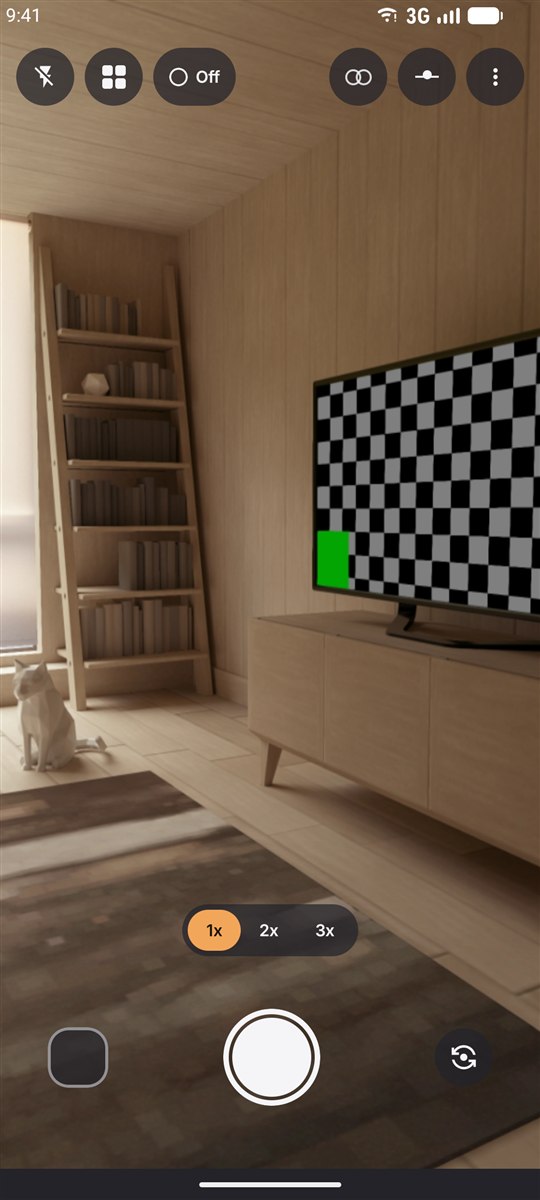
Frame and shoot
There is no Live mode to enable. Every shot records the second and a half around the shutter press; 3 seconds if you change it in Settings.
-
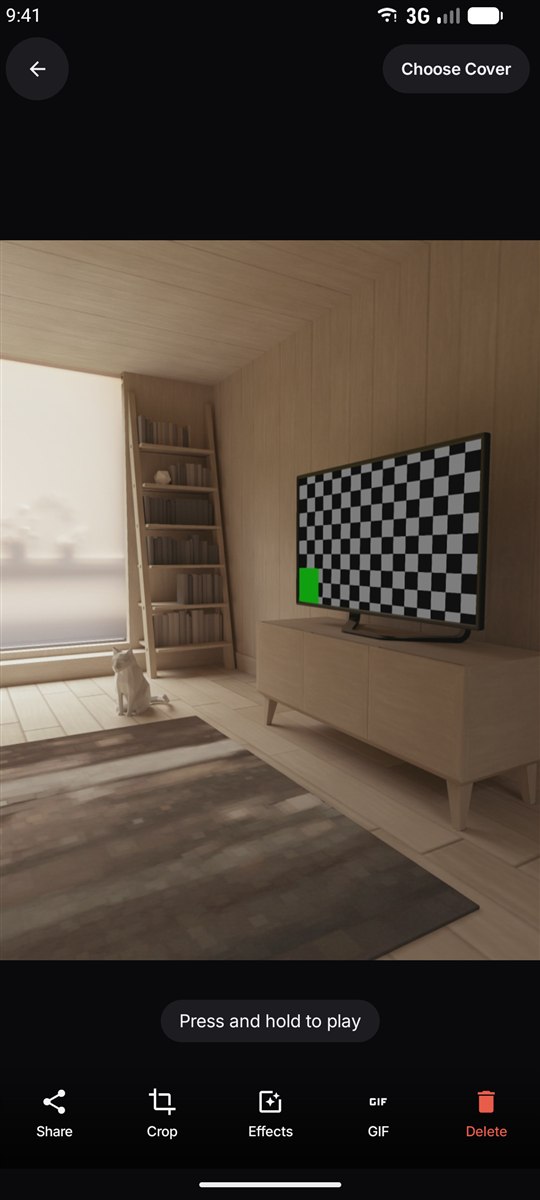
Press and hold to replay
In the app's gallery, hold your finger on any photo and it plays. The same press-and-hold works on the full-screen photo.
-
Check it in Google Photos
Open the same photo in Google Photos and hold it there. It should play, because the clip is embedded inside the JPEG rather than saved beside it.
Getting a Live Photo worth keeping
- Hold still a beat longer than feels necessary. The clip starts before your finger lands, so lowering the phone straight after the shot ends up in the recording.
- Shoot things that move. Hair in the wind, a pet mid-turn, someone about to laugh, waves, candles. A still subject makes a Live Photo that looks like a photo with a wobble.
- Give it light. A short clip in a dark room is a short noisy clip; the still survives low light far better than the video does.
- Mind the audio. Whatever is being said around you is recorded too. There is a sound toggle in Settings if you would rather it wasn't.
Playing them back
Press and hold. That is the gesture on every Android gallery that understands the format — Google Photos, Samsung Gallery, the Pixel gallery and Live Camera itself. A short tap just opens the photo; it is the hold that starts the clip.
Sharing one so it still moves
This is where most moving photos quietly die. A Motion Photo is a JPEG with the video hidden inside it, and plenty of apps strip anything they don't recognise when they re-compress your upload.
- Google Photos link or shared album: the movement survives.
- Sending the file itself (email, Drive, Telegram as a file, a cable): survives, because the bytes are untouched.
- Most chat apps and social networks: the still arrives, the motion does not.
- Anywhere else: export it as a GIF. It loses the audio and some quality, but it moves everywhere.
If it isn't working
The photo doesn't play when I hold it
Check you are holding rather than tapping, and that you are in a gallery app that reads Motion Photos. Google Photos does; some third-party gallery apps don't and show only the still.
My phone has no Motion Photo control anywhere
Then it genuinely doesn't have the feature — it isn't hidden in a menu. Use an app instead.
I sent it and my friend only sees a still
Almost certainly the transfer stripped it. Try a Google Photos link, or send the GIF version.
The clip is dark and grainy while the photo looks fine
Expected in low light. The still gets a longer exposure and more processing than the video frames do.
Questions people ask
Does Android have Live Photos?
Not as a system-wide feature. Android has an equivalent called Motion Photo, but it ships only in some manufacturers' camera apps — Samsung Galaxy and Google Pixel have it, most other brands do not. On a phone without it, a camera app can add the same capability.
Can Android take Live Photos?
Yes. If your camera app has a Motion Photo control, turn it on and every picture keeps a short clip of the moment around it. If it does not, install a camera app that records the clip and saves it in the same Motion Photo format — that last part is what decides whether other gallery apps can play it.
How do I enable Live Photo on Android?
Open your camera app and look along the top row of icons for a rounded square with a small play triangle, labelled Motion photo, Motion or Top Shot. Tap it so it lights up. If there is no such icon anywhere in the camera, your phone does not have the feature and an app is the only route.
How do I know if a photo is a Live Photo?
Open it in your gallery and press and hold. If a clip plays for as long as you hold, it is a moving photo. Samsung Gallery also shows a View motion photo control at the bottom, and Google Photos marks them with a small badge.
Do Live Photos on Android record sound?
Usually yes, since the clip is a normal video. Whether it is recorded, and whether it plays back, depends on the camera app — most offer a setting to turn the audio off if you would rather it did not.
Do Live Photos use more storage?
Yes. The video is stored inside the same file, so a moving photo is commonly two to four times the size of the same picture without one. Turning the feature on only when something is actually going to move is the practical compromise.
Can I take Live Photos with the front camera?
Yes, on both the built-in feature and third-party apps. One thing to check: the clip should be mirrored the same way the preview is, or the selfie you framed comes back reversed.